
When an AI agent like Kiro executes commands, modifies files, or runs scripts, it does so with whatever permissions your local environment provides. For workflows involving sensitive data, production credentials, or complex automation, this introduces meaningful risk. Sandboxing defines explicit boundaries around what Kiro can and cannot do, reducing that risk without sacrificing productivity.
This guide is written for developers using Kiro on macOS. It covers what sandboxing is, why it matters, and three practical methods for applying it to your workflow.
Table of Contents
What Is Sandboxing?
Why Sandboxing Is Needed
Can Hooks Replace a Sandbox?
How to Sandbox Kiro on macOS
Feature Comparison
Advantages of Sandboxing
Limitations of Sandboxing
Conclusion
What Is Sandboxing?
Sandboxing means running an AI agent, or the commands it issues, inside a restricted and isolated environment. The agent retains the ability to perform actions, but only within carefully controlled boundaries.
Consider the analogy of a workshop with a locked tool cabinet. A craftsperson can work freely within the workshop, using whatever tools are available, but cannot access anything locked away or work outside the designated space. Kiro operates in a similar fashion: it can execute commands, modify files, and run scripts, but only within the limits you define.
Why Sandboxing Is Needed
Without defined boundaries, an AI agent operates with the same access rights as the developer running it. In practice, this means it could accidentally:
delete important files
expose API keys or credentials stored in shell profiles
damage the operating system
modify files outside the intended project scope
access private data stored elsewhere on disk
Consider a command as simple as:
rm -rf /Without restrictions, this would destroy an entire macOS system. Sandboxing prevents this class of accident by restricting what the agent is permitted to touch before any command executes.
To see this in practice: suppose Kiro needs to run python app.py. With sandboxing, execution is constrained to /home/user/project. It cannot reach system folders, modify directories outside the project, or read sensitive files elsewhere. The operation completes normally, but the damage from any mistake is contained.
Can Hooks Replace a Sandbox?
Kiro supports hooks, which are rules that inspect and can block actions before they are executed. A common question is whether hooks provide sufficient security on their own. The short answer is: they help, but they are not a substitute.
A useful way to frame the distinction is:
Hooks are specific checks
A sandbox is the boundary itself
Hooks work by inspecting commands, checking for dangerous patterns, and allowing or blocking behavior accordingly. They are a valuable layer of defense. However, hooks are implemented in software and carry the same vulnerabilities as any software system. If a hook fails to match the exact command invocation used, the command proceeds. A sandbox restricts access at the environment level regardless; the operating system enforces the boundary, not the hook.
Hooks and sandboxing are complementary, not competing. Hooks provide targeted checks; sandboxes provide the hard boundary that catches what hooks miss.
How to Sandbox Kiro CLI on macOS
There are three primary approaches, each suited to a different level of isolation and workflow complexity.
1. Use a Virtual Machine (UTM)
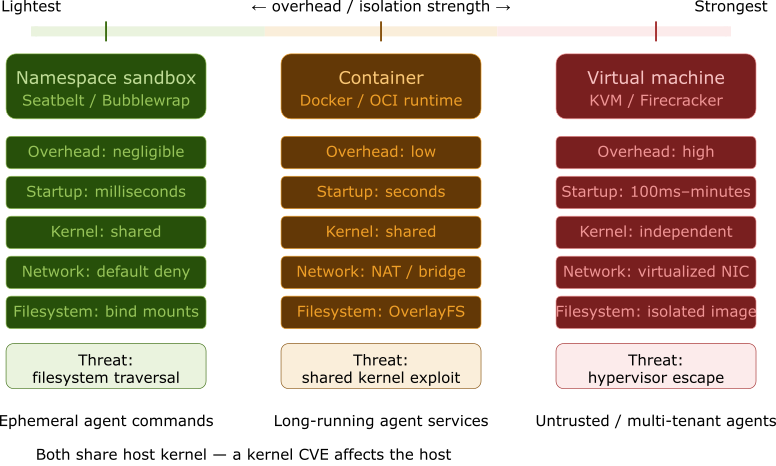
A virtual machine (VM) provides the most complete form of isolation available. It creates an entirely separate macOS environment, with its own kernel, filesystem, and user profile, running as a guest on your physical machine. Kiro, installed inside the VM, has no visibility into your host machine’s files, credentials, or shell configuration.
For macOS on Apple Silicon, UTM is the recommended choice. It is free, and well-suited to running macOS guest environments.
Setup steps:
Download and install UTM from the official site (mac.getutm.app) or from the Mac App Store.
Open UTM and select Virtualize from the start screen.
Choose macOS 12+ as the operating system.
Import or download the macOS installer. If UTM offers the option to continue without selecting an IPSW file, it will use the installer on your boot partition.
Set RAM and CPU limits appropriate to your host machine.
Set a disk size for the virtual environment.
Review and save the configuration on the Summary screen. The VM will appear in the left sidebar.
Launch the VM using the play button. Initial setup will take several minutes to complete.
Once the guest environment is running and kiro-cli is installed inside it, the agent operates in complete isolation. Your host machine’s Documents folder, Desktop, credentials, and shell profiles remain invisible to it.
2. Use a Container (Docker)
Docker containers offer a lighter-weight alternative to a full VM. They share the host macOS kernel but isolate the filesystem, processes, and network from the host environment. If a script runs incorrectly inside the container, only the container is affected; the host machine remains unchanged.
Setup steps:
Create a
Dockerfile:
FROM node:lts-slim
RUN apt-get update && apt-get install -y git curl python3 build-essential
WORKDIR /workspace
RUN curl -fsSL https://cli.kiro.dev/install | bash
Build and tag the image:
docker build -f Dockerfile -t kiro-sandbox .Start the container, mounting only the specific project directory Kiro should access:
docker run -it --rm \
  -v $(pwd):/workspace \
  kiro-sandbox bash
3. Use Application-Level Isolation (SRT)
For developers who prefer to work directly on their local machine without a VM or container, application-level isolation provides a practical middle ground. Anthropic’s Sandbox Runtime (srt) wraps kiro-cli in a declarative sandbox, enforcing filesystem and network boundaries using Apple’s native Seatbelt security framework on macOS.
It’s worth noting that srt is an experimental tool. Its configuration and API may evolve over time.
Setup steps:
Install the Sandbox Runtime via npm:
npm install -g @anthropic-ai/sandbox-runtimeCreate the configuration file at
~/.srt-settings.json. The paths listed underallowWritemust include the application’s data directory, or the tool will not start correctly:
{
  "allowPty": true,
  "enableWeakerNestedSandbox": true,
  "enableWeakerNetworkIsolation": true,
  "network": {
    "allowedDomains": [
      "*.kiro.dev",
      "*.amazonaws.com",
      "*.awsapps.com",
      "*.aws.dev"
    ]
  },
  "filesystem": {
    "allowWrite": [
      "./workspace",
      "~/Library/Application Support/kiro-cli/",
      "~/.kiro"
    ]
  }
}
Launch
kiro-cliinside the sandbox:
srt kiro-cli chatOn macOS, srt hooks into Apple’s Seatbelt framework to enforce these boundaries at the kernel level. Any attempt by Kiro to write outside the allowWrite list or reach an unlisted domain is blocked before it executes.
Feature Comparison
The three approaches differ not just in setup complexity, but in where the isolation boundary sits in the computing stack. The table below compares them across eight technical dimensions.
Advantages of Sandboxing
Blast Radius Containment: If something goes wrong, damage is confined to the sandbox; the host machine is unaffected and the sandbox can simply be discarded.
Secure Execution of Untrusted Code: Safely test unfamiliar scripts or third-party tools without auditing every line in advance.
Protection Against Zero-Day Exploits: Restricting what an application is permitted to do limits potential damage from vulnerabilities that have not yet been disclosed or patched.
Clean, Reproducible Environments: Each instance starts from a known state, free of stale configuration or leftover artifacts from previous sessions.
Limitations of Sandboxing
Performance and Resource Overhead: Isolation boundaries require computational resources. Virtual machines in particular introduce meaningful CPU, RAM, and startup time costs that may affect developer experience.
Sandbox Escape Vulnerabilities: No isolation mechanism is perfect. A flaw in the sandbox implementation can allow a process to break containment. External data sources, such as repositories containing hidden Unicode payloads, represent a less obvious escape vector.
Context Blindness and Friction: The sandbox may block Kiro’s access to local files or internal tools it legitimately needs. Some configuration is necessary to restore that access without reopening the boundaries the sandbox is meant to enforce.
Sandbox-Aware Behavior: Some malicious software detects when it is running inside a test environment and suppresses its harmful behavior, only revealing itself once it reaches an unrestricted host.
Trusted-Channel Data Poisoning: Allowlisting domains like
github.comorgoogle.comgrants network access but cannot sanitize the content returned. A prompt injection payload in a repository file, or adversarially crafted search results, can manipulate Kiro’s behavior from within the sandbox. The boundary controls what the agent can reach, not what it reads or how it interprets that content.No Defense Against Agentic Attack Vectors: Sandboxing operates at the system and network level and does not address the behavioral attack surface of an AI agent. The OWASP Top 10 for LLM Applications identifies risks sandboxing cannot mitigate: goal hijacking, tool misuse, identity abuse, unexpected code execution, and context poisoning. These attacks target model reasoning, not the host OS, and pass through sandbox boundaries undetected.
Conclusion
Sandboxing controls what Kiro can access at the system and network level; it does not govern how the agent reasons about or responds to the content it retrieves. For macOS developers, the three approaches covered here represent a progression from maximum isolation to minimum friction.
A virtual machine is the right choice when the risk profile demands the strongest possible guarantee, such as working with sensitive data or long-running agents.
A container is a sensible default for most development work, offering solid isolation with familiar tooling and low overhead.
Application-level isolation via
srtis well-suited to developers who need to stay close to their local environment while still enforcing meaningful boundaries around what Kiro can access.